
Benefits of Clearing Browser
Cache
Clearing browser cache can significantly enhance your experience
with web-based tools.
Over time, browsers accumulate a variety of data, including
images, scripts, and other files from frequently visited websites. While this
caching can facilitate quicker load times on subsequent visits, it may also
result in slower performance, outdated content, and errors when accessing
certain sites.
Here are some key benefits of regularly clearing your browser
cache:
ü Improved Performance: Clear cache helps to
free up memory, allowing your browser to run more efficiently and load pages
faster.
ü Updated Content: By clearing your
cache, you ensure that you are viewing the latest versions of web pages, which
can be crucial for accessing current information or features.
ü Fewer Errors: A cluttered cache can lead to loading issues and
errors on websites. Clearing it out can minimize these disruptions.
ü Enhanced Security: Regularly clearing
your cache can help protect your data and privacy by removing stored personal
information that may be at risk.
To clear your browser cache, you can typically find the option in
your browser's settings or preferences. It's a quick and easy process that can
lead to a more seamless online experience.
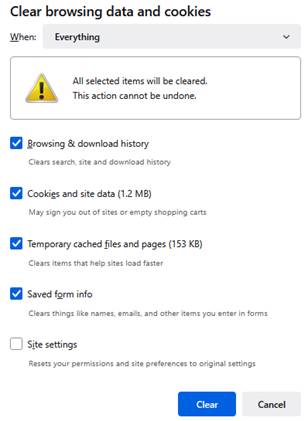
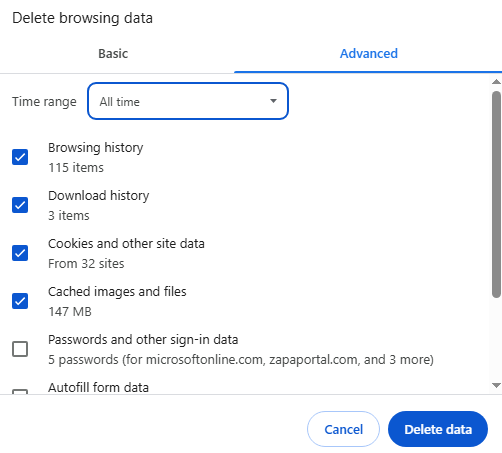
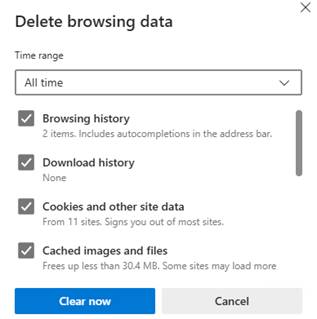
To clear your browser's cache, please press the Control, Shift, and
Delete keys
simultaneously. In Firefox, ensure you select the "Everything" option, while in Chrome and Edge, choose "All Time" to effectively remove
all cached data.
|
Firefox |
Chrome |
Edge |
|
|
|
|
If you have any questions regarding this process or require assistance, please do not hesitate to contact our Support Team.